> ## Documentation Index
> Fetch the complete documentation index at: https://docs.gettap.co/llms.txt
> Use this file to discover all available pages before exploring further.
# Insights overview
> What your team's conversations add up to — volume, topics, objections, and follow-through.
Insights roll every recorded meeting and captured lead into a picture of what your team is actually encountering in the field. It answers questions that are hard to get from a CRM: what objections keep coming up, which accounts have gone quiet, and who follows through on what they promised.
Insights are built from **recorded meetings**. A team that captures leads but never records conversations will see activity counts and little else. The richer views — topics, objections, sentiment — need transcripts to work from.
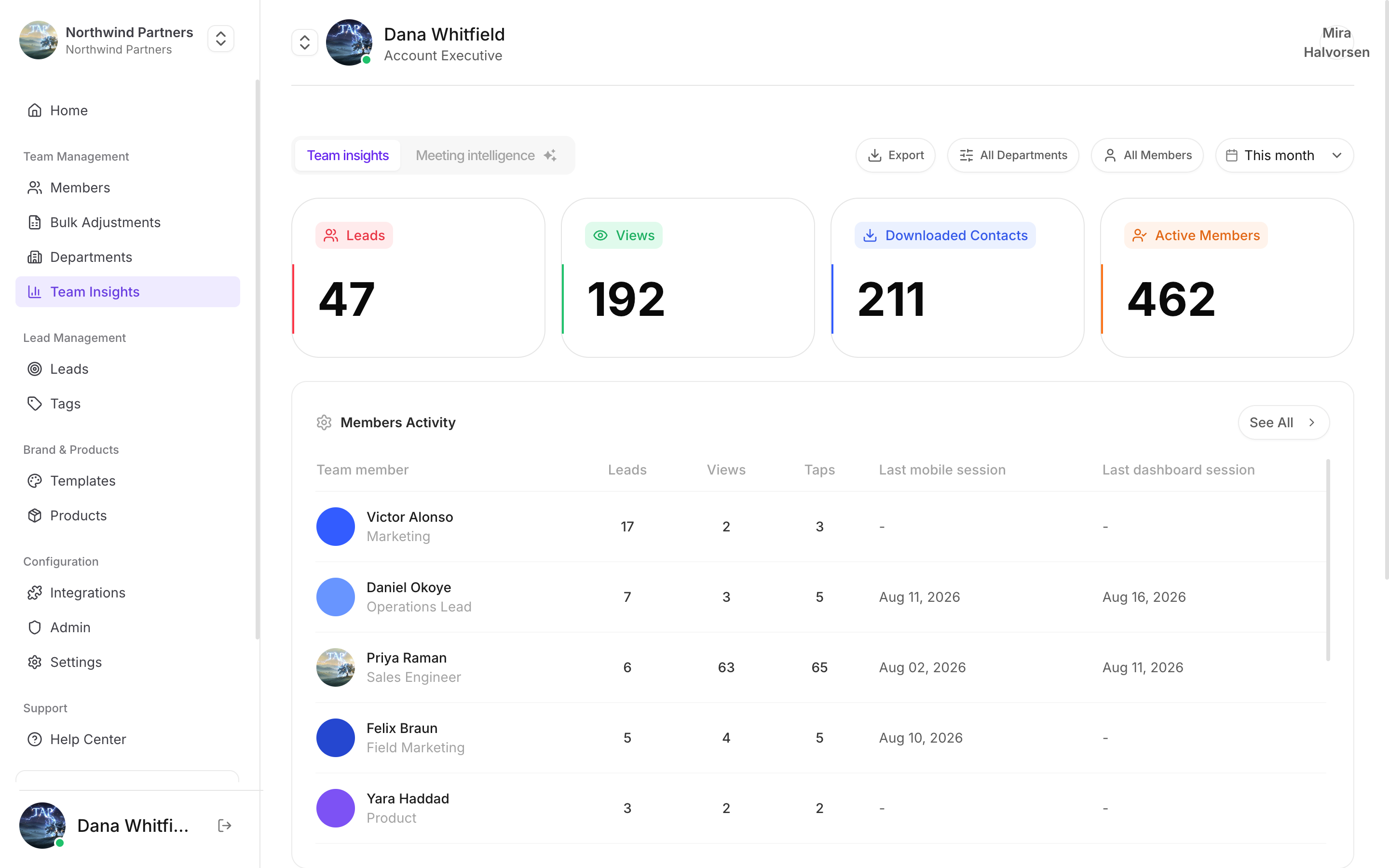
## The headline numbers
| Metric | Meaning |
| - | - |
| Leads | Captured in the period |
| Views | Card views across the team |
| Downloaded Contacts | How often someone saved a member's details |
| Active Members | How many people are actually out there using Tap |
**Leads and connections are counted separately.** A *lead* is someone your team captured — through the capture form or the card scanner. A *connection* is a link between two Tap users who connected in the app. They used to share a count, which inflated both the totals and the acceptance rate; each connection is now counted once per relationship, and captured leads have their own number.
Figures for periods before September 2026 were produced the old way, so a long comparison range can show a step change that is a counting fix rather than a drop in activity.
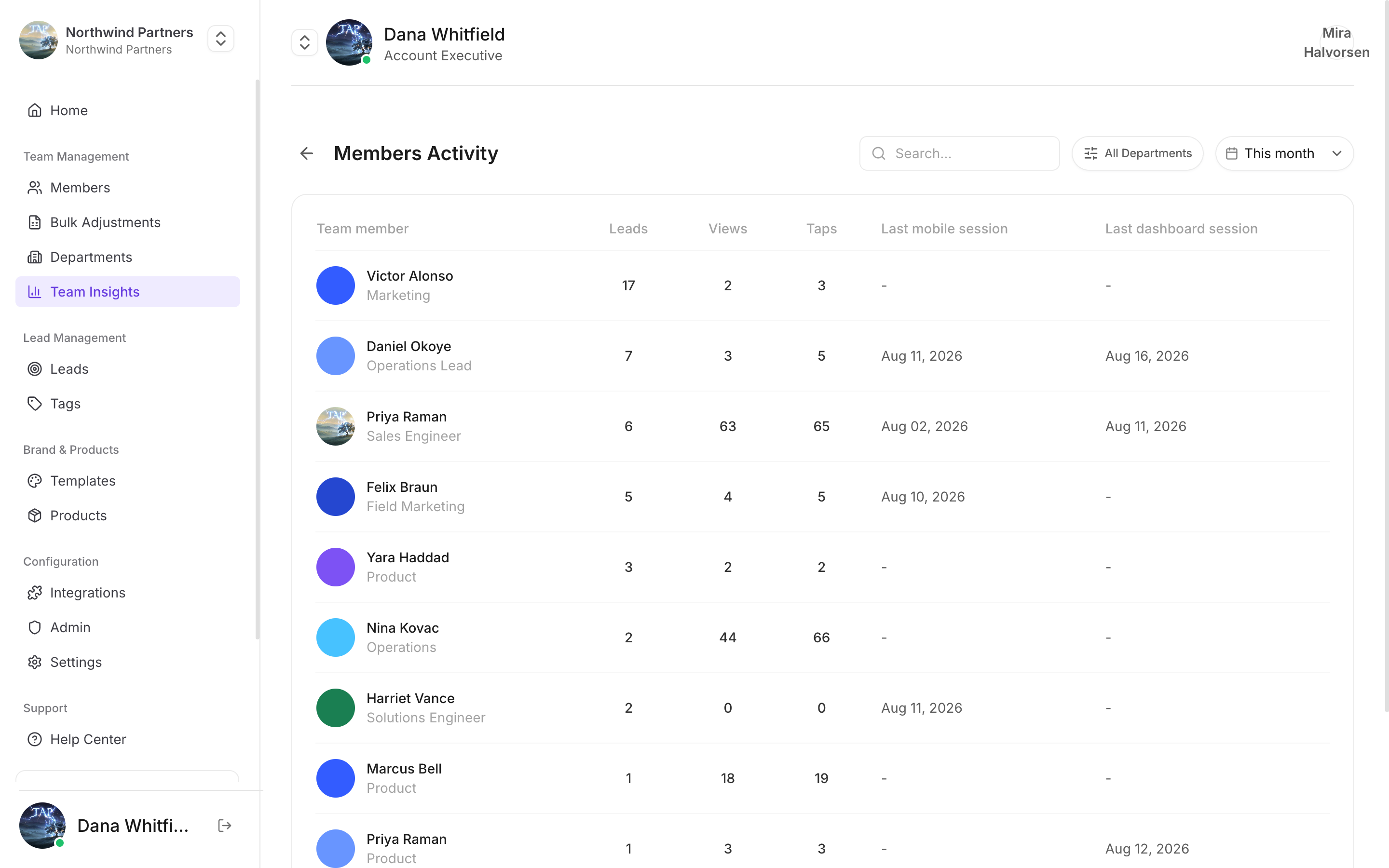
Below them, **Members Activity** breaks the same figures down per person and adds notes written, last mobile session, and last dashboard session — the fastest way to spot someone who has quietly stopped using the app. See [Member activity](/en/insights/members).
You can filter by department or member, and export the result.
A separate **Meeting intelligence** tab covers what was said, rather than how much activity happened.
## Notes
Two widgets read what your reps write and record on leads:
* **Notes** — how many notes were written this month, and how many need attention. Each flagged note carries a reason: **Unanswered** (a note promised something and nothing has been logged since), **Risk** (several notes on one account say the deal is in trouble), or **Competitor** (a competitor is being named). **See all** lists every flagged note, and each flag opens the notes behind it.
* **Note themes** — what the notes are about, grouped by meaning rather than keyword. Each bar is coloured by how the notes read: positive, neutral, or negative. Themes appear once there are enough notes in the period.
"Nothing flagged right now" is the normal state for a healthy team. See [Notes](/en/leads/notes) for the notes themselves.
## Lead quality
Two cards show how your team answered the [lead qualifiers](/en/leads/lead-scoring#qualifying-a-lead-after-capture):
* **Buying Role** — how many decision makers you met, and the split across influencers, end users, gatekeepers, and leads marked not relevant.
* **New vs Current Business** — how many leads are new, existing, or returning.
Each card says how many leads were qualified out of the total. Leads where the rep skipped the question are counted as skipped, and leads captured before the questions existed are counted as never asked.
## Choosing a period
Every view is scoped to a date range, and each headline number is compared against the equivalent preceding period, so you see direction rather than just magnitude.
Compare like with like. A week containing a major conference against a quiet week tells you nothing except that conferences exist. For event-driven teams, compare this event to the last one rather than this month to last month.
## What's in each view
Activity per person — leads captured, notes written, and when each member last used Tap.
What conversations are actually about, and what's standing in the way.
Who closes the loop on what they promised, and who doesn't.
Which profiles are being viewed and tapped — useful for judging whether a template change helped.
What your reps are writing and recording on leads, how many need attention, and the themes running through them.
## Headline numbers
The overview leads with meeting volume over time, your most recent meetings, and the accounts appearing most often in conversations.
Two views deserve particular attention:
* **Sentiment trends** — how the tone of conversations is moving. A steady decline usually shows up here before it shows up in your pipeline.
* **At-risk accounts** — accounts whose conversations have turned negative or gone quiet. This is the list worth reading every week.
## Reading insights well
More meetings isn't automatically better. Read volume alongside sentiment and follow-up completion — a rep doing half the meetings and closing every loop may be outperforming one doing twice as many badly.
A recurring objection is either a real product gap or a positioning failure. Either way it's fixable, and it's cheaper to fix once centrally than to let thirty reps improvise around it.
A topic appearing in three conversations is noise. Wait for enough volume before restructuring your pitch around a pattern.
Territories and events differ enormously. Someone working a quiet regional show can't match someone at a flagship conference, and treating that as performance breeds gaming rather than improvement.
This documentation is built and hosted on [Mintlify](https://mintlify.com), a developer documentation platform.