> ## Documentation Index
> Fetch the complete documentation index at: https://docs.gettap.co/llms.txt
> Use this file to discover all available pages before exploring further.
# Links
> Everything a visitor can reach from your profile — including embedded media and direct mode.
Links are the rows on your profile: your phone number, email, LinkedIn, a booking link, a PDF, a payment link. Each has a **type** that decides how it renders and what happens when someone taps it.
## Adding a link
Choose the type first, then fill in the value. The type matters — a phone number added as a phone link opens the dialler, while the same digits as plain text do nothing.
You can search the available apps and services, or add a fully custom link. Each link can carry a title and a description.
If a link type you want isn't available, it's one of two things: your department restricts it, or it's included only on a higher plan. Department restrictions are the more common of the two and free to change — ask your admin first.
## Embedded media
Some links render as playable or browsable content on your profile rather than as a row to tap:
Embed a Spotify link and it plays directly in your profile.
Embed a YouTube video that previews inside the profile.
Add up to 10 images as a swipeable gallery.
Check the preview after adding a media link. If the embed doesn't appear there, the URL isn't in a form the player recognises — and it will fail the same way for visitors.
## Ordering and highlighting
Order deliberately: most visitors read the top two or three rows and stop. Put the action you most want first — usually a booking link or a direct email, not a switchboard number.
Links can also be **highlighted**, which floats them above the rest.
## Visibility
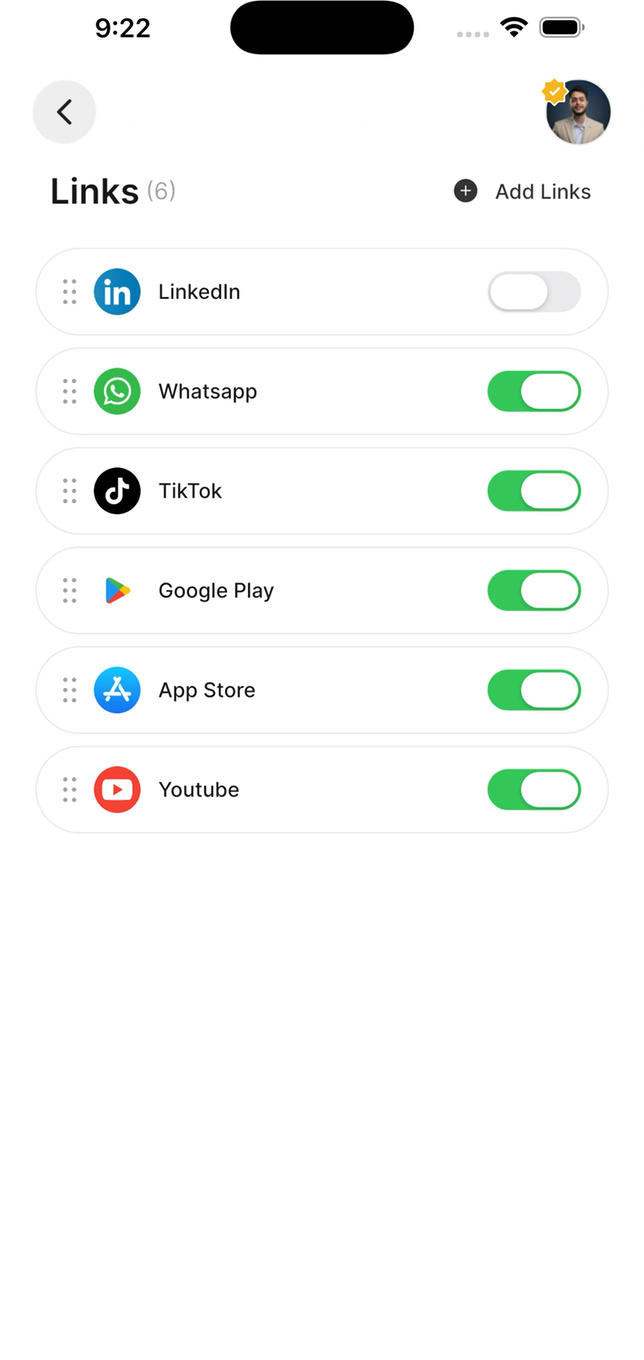 Each link can be shown or hidden without deleting it. Useful for a link that's only relevant during a campaign or an event — hide it afterwards rather than rebuilding it next time.
## Direct mode
Direct mode redirects your profile to a single link. Instead of seeing your profile, anyone who taps or scans goes **straight to that one destination**.
Direct mode replaces your entire profile. Visitors won't see your other links — and if lead capture is on, they won't see your capture form either, so **you stop collecting leads** while it's active.
It's a purposeful tool for a specific moment: sending an audience straight to a signup page during a talk, or to a menu, or to a single campaign. It's a poor default.
Turn it off to restore the normal profile. Nothing is lost while it's on.
## Link groups
Group related links so they present together — all your social accounts under one heading. Groups keep a profile with many links readable.
## Analytics
Links track views and clicks, and you can see which link is clicked most. This is the most honest feedback you'll get about your profile: a link nobody ever taps is taking up space above one they might.
See [Profile analytics](/en/mobile/analytics).
## Keeping links working
A marketing site restructure quietly breaks every deep link into it. Nobody tells you — visitors just hit a 404 and leave.
Include `https://`. A URL without it can be treated as relative and fail.
Eight links is a menu nobody reads. Four is a set of choices.
A file link points at what you uploaded. Updating the document elsewhere doesn't update what visitors receive.
This documentation is built and hosted on [Mintlify](https://mintlify.com), a developer documentation platform.
Each link can be shown or hidden without deleting it. Useful for a link that's only relevant during a campaign or an event — hide it afterwards rather than rebuilding it next time.
## Direct mode
Direct mode redirects your profile to a single link. Instead of seeing your profile, anyone who taps or scans goes **straight to that one destination**.
Direct mode replaces your entire profile. Visitors won't see your other links — and if lead capture is on, they won't see your capture form either, so **you stop collecting leads** while it's active.
It's a purposeful tool for a specific moment: sending an audience straight to a signup page during a talk, or to a menu, or to a single campaign. It's a poor default.
Turn it off to restore the normal profile. Nothing is lost while it's on.
## Link groups
Group related links so they present together — all your social accounts under one heading. Groups keep a profile with many links readable.
## Analytics
Links track views and clicks, and you can see which link is clicked most. This is the most honest feedback you'll get about your profile: a link nobody ever taps is taking up space above one they might.
See [Profile analytics](/en/mobile/analytics).
## Keeping links working
A marketing site restructure quietly breaks every deep link into it. Nobody tells you — visitors just hit a 404 and leave.
Include `https://`. A URL without it can be treated as relative and fail.
Eight links is a menu nobody reads. Four is a set of choices.
A file link points at what you uploaded. Updating the document elsewhere doesn't update what visitors receive.
This documentation is built and hosted on [Mintlify](https://mintlify.com), a developer documentation platform.